


Your Android phone probably has a decent built-in microphone. For phone calls, voice notes, and quick videos, it may be all you need.
But things change when you start creating content you actually want people to watch.
Record a YouTube video outside and wind can overpower your voice. Film an interview in a busy room and background noise becomes distracting. Start a podcast on your phone and the built-in microphone can make your voice sound distant.
An external microphone can make a huge difference.
The good news is that Android users now have plenty of options. You can buy tiny USB-C microphones that plug directly into your phone, wireless microphones for filming, or higher-quality microphones designed for music and professional content.
What is the Best Android Microphones?
Here are some of the best Android microphones to consider.
1. Shure MV88+ – Best Overall Android Microphone
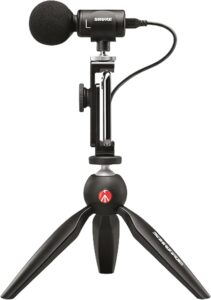
The Shure MV88+ is my overall pick for Android users who care about recording quality. It’s a compact condenser microphone designed for mobile recording.
One of its biggest advantages is versatility.
The MV88+ uses two microphone capsules in a Mid-Side configuration. This allows you to change how the microphone captures sound depending on what you’re recording.
You can use mono cardioid for focused speech or adjust the stereo width when recording music, performances, or environmental sound.
Shure gives you even more control through its MOTIV app. You can adjust microphone gain, compression, EQ, stereo width, and other settings.
There’s also a 3.5 mm headphone output for monitoring.
Shure says the MV88+ works with compatible Android devices supporting the necessary USB audio requirements.
For someone recording podcasts, interviews, music, YouTube videos, or other serious mobile content, it’s one of the most flexible choices.
Best for: Content creators, musicians, interviews, podcasting, and high-quality mobile recording.
2. RØDE VideoMic Me-C – Best Plug-and-Play Android Microphone
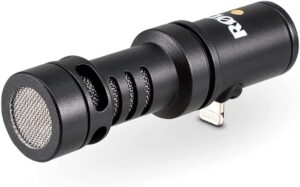
Sometimes you don’t want cables, receivers, transmitters, or complicated apps. You just want better sound. That’s where the RØDE VideoMic Me-C makes sense.
It’s a small directional microphone designed specifically for USB-C mobile devices. Plug it into your Android phone, point it toward your subject, and start recording. The directional design is important.
Your phone’s internal microphones can capture sound from several directions. That’s useful for certain situations, but not ideal when you’re trying to clearly record someone talking in front of the camera.
The VideoMic Me-C focuses more strongly toward the direction you’re filming.
RØDE also includes a furry windshield. That’s particularly useful outdoors, where even moderate wind can destroy an otherwise good recording. There’s also a 3.5 mm headphone jack for monitoring and playback.
RØDE lists the VideoMic Me-C as compatible with most USB-C mobile devices running Android 10 or later.
Best for: Vlogging, TikTok, YouTube, travel videos, and simple mobile recording.
3. RØDE VideoMic GO II – Best Android Microphone for Video
If you’re more serious about video production, consider the RØDE VideoMic GO II. This is a compact directional shotgun microphone that can work with cameras, computers, and compatible mobile devices.
That flexibility makes it more useful than buying a microphone that only works with your phone.
Maybe you shoot everything on Android today. Next year, you buy a mirrorless camera. Instead of replacing your microphone, you may be able to continue using the VideoMic GO II.
Its directional pickup is useful when you’re trying to capture the person or subject in front of the camera without making everything around them equally prominent.
RØDE currently lists the VideoMic GO II among its USB microphones compatible with Android devices.
For mobile filmmakers and YouTubers who expect their recording setup to grow, that’s valuable.
Best for: YouTube, filmmaking, vlogging, and creators using both phones and cameras.
4. RØDE VideoMic NTG – Best Premium Shotgun Microphone for Android
The RØDE VideoMic NTG takes the shotgun microphone idea further. This is the option I’d consider for someone who wants one microphone capable of working across a more serious content-production setup.
It can be used as an on-camera microphone, but its USB connectivity also allows it to work with compatible Android devices.
That means the same microphone can move between your smartphone, computer, and camera setup.
This matters more than it might seem. Cheap microphones are often designed around one specific device.
Once your setup changes, the microphone becomes useless. A more flexible microphone costs more initially but may stay useful much longer.
The VideoMic NTG is especially attractive for filmmaking, interviews, YouTube videos, and other situations where you want focused directional audio.
Best for: Serious video creators and mobile filmmakers.
5. Shure MV88+ Video Kit – Best Android Microphone Kit
Sometimes buying the microphone is only the beginning. Then you realize you need a phone holder. Then a tripod.
Then the correct cable. That’s why the Shure MV88+ Video Kit is worth considering. It takes the MV88+ microphone and builds a more complete mobile recording system around it.
The microphone itself can record in several configurations, including stereo, mono cardioid, mono bidirectional, and Mid-Side.
The kit approach is useful for someone who wants to turn an Android phone into a small content-production rig.
Put the phone on the included support system, connect the microphone, adjust your settings, and you have a compact setup for interviews, performances, videos, and mobile journalism.
The MV88+ also supports 24-bit recording at sample rates up to 48 kHz.
Best for: Mobile journalists, musicians, serious content creators, and interview recording.
6. RØDE NT-USB Mini – Best Android Microphone for Podcasting
What if you don’t want to walk around while recording? Maybe your Android phone is replacing a laptop in a small podcast setup.
In that case, a desktop microphone makes more sense.
The RØDE NT-USB Mini is worth considering. It’s a compact USB microphone designed primarily for spoken-word recording, streaming, and content creation.
RØDE currently lists the NT-USB Mini as compatible with Android through USB.
This gives you a completely different recording style from a small microphone attached directly to the phone.
Put your Android device on a stand. Place the NT-USB Mini on the desk. Position yourself close to the microphone. Now you have something much closer to a traditional podcast setup. This isn’t the microphone I’d choose for walking around outside.
For a desk-based podcast, livestream, voiceover, or interview, however, it makes much more sense.
Best for: Podcasting, voiceovers, livestreaming, and desk recording.
7. RØDE PodMic USB – Best Android Podcast Microphone
If you want an even more traditional podcast microphone, look at the RØDE PodMic USB. The original PodMic became popular as an XLR broadcast microphone.
The USB version makes the concept considerably more flexible. You can use it through XLR with a traditional audio interface or through USB with compatible devices.
RØDE currently lists the PodMic USB as Android compatible. That’s a powerful combination for a podcaster. You could start by connecting the microphone to an Android phone.
Later, you might build a studio with an audio interface or RØDECaster and switch to XLR. You don’t necessarily have to replace the microphone. The downside is portability. This isn’t a tiny microphone you clip onto your shirt.
It’s a proper broadcast-style microphone that makes more sense on a desk or boom arm.
Best for: Android podcasting and spoken-word recording.
8. Wireless Microphone Systems – Best for Interviews
A directional microphone works well when the person speaking is relatively close to the phone. But what happens when they’re 15 feet away?
That’s where wireless microphones become useful.
A wireless microphone system normally includes a small transmitter worn by the speaker and a receiver connected to the phone.
The microphone stays close to the person’s mouth even when they walk away from the camera. This is excellent for interviews. It’s also useful for fitness videos, demonstrations, travel videos, and social media content.
Current wireless systems from brands such as RØDE, DJI, Shure, Hollyland, and Sennheiser offer USB-C options suitable for many modern Android devices.
If you’re filming yourself from a distance, I’d generally choose a wireless microphone over a microphone attached directly to the phone.
Best for: Interviews, TikTok, Instagram Reels, YouTube Shorts, and talking-head videos.
USB-C vs 3.5 mm Android Microphones
USB-C has become the easiest connection for most modern Android phones. Many newer phones don’t even have a 3.5 mm headphone jack.
A USB-C digital microphone can connect directly to a compatible phone and send digital audio into the device.
That’s convenient. However, compatibility isn’t universal. Just because a microphone physically fits into your phone’s USB-C port doesn’t guarantee that every Android phone and every recording app will behave exactly the same way.
Wired vs Wireless Android Microphones
Choose based on how you’re recording. A wired microphone is generally simpler. There are no wireless connections to manage and usually no transmitter battery to worry about.
If you’re sitting at a desk recording a podcast, wired is perfect. Wireless becomes more useful when you move around.
Imagine recording a cooking video. Your phone might be several feet away while you’re walking around the kitchen.
A wireless microphone stays attached to you, so your voice remains relatively consistent even when you move farther from the camera.
For mobile video creators, that freedom can be worth the extra cost.
Directional vs Lavalier Microphones
A directional microphone normally points toward the sound you want to capture. The RØDE VideoMic Me-C is a good example.
This works well when your subject stays in front of the phone. A lavalier microphone is a small microphone worn on clothing.
Because it stays close to your mouth, it’s excellent for interviews and presentation-style videos. Neither is automatically better.
For vlogging with the phone close to you, a directional microphone can be extremely convenient. For filming someone from across a room, use a lavalier or wireless system.
Best Android Microphone for Podcasting
For a traditional desk-based podcast, I’d choose something like the RØDE PodMic USB or NT-USB Mini.
You’re not trying to make the microphone invisible. You want your voice to sound clear and consistent. Put the microphone close to your mouth and record in the quietest room available.
For a portable podcast where you’re constantly changing locations, the Shure MV88+ becomes more interesting.
It’s much easier to carry.
Best Android Microphone for YouTube
This depends on your filming style. For simple handheld videos, the RØDE VideoMic Me-C is probably the easiest recommendation. It plugs directly into a USB-C phone and doesn’t require a complicated rig.
For more serious filmmaking, I’d move toward the VideoMic GO II or VideoMic NTG.
If you’re filming yourself from farther away, use a wireless microphone instead. Distance matters enormously in audio.
A cheap microphone six inches from your mouth can sometimes produce a more useful recording than an expensive microphone sitting across the room.
Best Android Microphone for Music
This is where I’d choose the Shure MV88+. Its adjustable stereo capabilities make it much better suited to capturing instruments, performances, and environmental sound than a simple mono speech microphone.
Shure’s MOTIV software also gives you control over gain, compression, EQ, limiter settings, and stereo width.
That’s valuable when you’re recording something more complicated than one person talking.
For musicians who regularly record demos or performances on their phones, it’s one of the most interesting Android-compatible options.
Do Android Microphones Need an App?
Not always. Many USB microphones can work with compatible Android recording apps without requiring special software. However, manufacturer apps can unlock additional features.
Shure’s MOTIV software, for example, lets you control settings such as gain, stereo width, EQ, compression, and recording presets on compatible products.
RØDE also offers software for some of its microphones. You don’t necessarily need these tools to make a good recording.
But having manual control can be useful when you’re trying to improve your sound.
Which Android Microphone Should You Buy?
For overall versatility, my pick is the Shure MV88+. It works with compatible Android devices, supports multiple pickup configurations, offers headphone monitoring, and gives you extensive control through Shure’s MOTIV software.
If you want something much simpler, choose the RØDE VideoMic Me-C. Plug it into a compatible USB-C Android phone and you have a straightforward directional microphone for video.
For serious mobile filmmaking, consider the RØDE VideoMic NTG. For a desk-based podcast, I’d choose the RØDE PodMic USB or NT-USB Mini.
And if the person you’re recording needs to move around or stand far away from your phone, buy a wireless microphone system instead.
Final Thoughts
The best Android microphone depends much more on what you’re recording than how much you’re willing to spend.
A $300 shotgun microphone isn’t automatically better than a small USB-C microphone.
If you’re walking around making travel videos, portability matters. If you’re interviewing someone from across the room, wireless matters. If you’re recording a podcast at a desk, microphone positioning and spoken-word quality matter.
And if you’re recording live music, stereo capture may be far more important.
For most creators who want a versatile high-quality mobile recording setup, the Shure MV88+ is my best overall Android microphone.
For someone who simply wants better video audio without turning their phone into a complicated recording rig, the RØDE VideoMic Me-C is the easier choice.
Whichever microphone you buy, remember one simple rule: Get the microphone close to the sound you actually want to record.
Good microphone placement can improve your audio more than spending hundreds of dollars on equipment you don’t know how to use.