


A good microphone is important, but where you put that microphone matters just as much. If your mic is sitting too low on your desk, you’ll probably lean forward every time you speak. If the stand is unstable, the microphone may slowly move out of position. And if every keyboard tap or desk bump travels directly into the mic, even an expensive microphone can sound frustrating.
That’s why a good microphone desk stand is worth buying.
There are several types to choose from. Traditional desktop stands use a weighted base and take only a few seconds to set up. Boom arms clamp to the edge of your desk and give you much more positioning freedom. Low-profile arms stay below your monitor and can create a cleaner-looking streaming setup.
For most people, the best choice depends on the amount of desk space available and the weight of the microphone.
What is the Best Mic Desk Stands?
Here are some of the best mic desk stands to consider.
1. RØDE DS1 – Best Traditional Mic Desk Stand
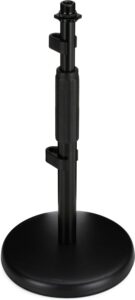
If you want something simple, a traditional desktop stand such as the RØDE DS1 makes a lot of sense. There’s no desk clamp to install. There’s no complicated arm to adjust.
Put the stand on your desk, attach your microphone, adjust the height, and start recording. This design works particularly well for podcasts, voice calls, gaming, and occasional recording.
A weighted base is important because microphones can be surprisingly heavy, especially once you add a shock mount and pop filter.
The disadvantage is desk space. Unlike a boom arm that attaches to the edge of your desk, a conventional stand needs a permanent area directly in front of you. That’s fine on a large desk.
On a tiny gaming desk already occupied by a keyboard, mouse, speakers, and monitor, it may become annoying.
2. Elgato Wave Mic Arm LP – Best Low-Profile Mic Desk Stand
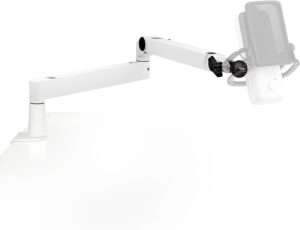
The Elgato Wave Mic Arm LP is an excellent choice for streamers and creators who want to keep their microphone below their monitor. Instead of rising high above your desk like a traditional boom arm, it uses a low-profile design. That can make your setup look much cleaner on camera.
The arm provides a horizontal reach of 740 mm, or about 29.1 inches. It can rotate 360 degrees horizontally at the base and elbow, while the elbow provides 90 degrees of upward and 60 degrees of downward vertical rotation.
More importantly, it can support microphones and accessories weighing up to 2 kg, or 4.4 pounds. That means it can handle many popular USB and XLR microphones along with shock mounts.
The padded desk clamp supports desks up to 60 mm, or approximately 2.4 inches, thick. Elgato also includes 3/8-inch and 5/8-inch adapters, helping it work with a wide range of microphones.
Built-in magnetic cable channels keep your microphone cable from hanging loosely around the arm.
3. RØDE PSA1+ – Best Premium Boom Arm
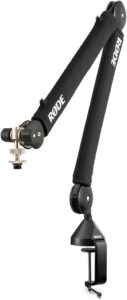
If you want a more traditional professional boom-arm setup, the RØDE PSA1+ is worth considering. Boom arms have one major advantage over ordinary desk stands: positioning.
You can pull the microphone toward your mouth when you’re recording and move it away when you’re finished. That’s extremely useful for podcasting and streaming.
It also allows you to keep the microphone close to your mouth without sacrificing the space directly in front of your keyboard.
The PSA1+ is designed to handle common broadcast microphones and accessories such as shock mounts.
A good boom arm should also move smoothly. You don’t want the microphone suddenly dropping toward your desk because the arm can’t support its weight.
For creators using larger microphones, paying more for a sturdy arm can be worthwhile.
4. RØDE DS3 – Best Freestanding Desktop Arm
The RØDE DS3 takes an interesting approach to desktop microphone mounting. Instead of clamping to the edge of your desk, it uses a heavy freestanding base.
That gives you some of the flexibility of an articulated arm without permanently attaching anything to your desk.
The current DS3 uses a 1.5 kg weighted base and supports payloads up to 1.5 kg. Its articulated metal arm can be repositioned, and the mounting system can accommodate microphones as well as other creator equipment such as cameras, lights, and smartphones with the appropriate accessories.
That versatility is useful if your desk changes regularly. Maybe you record a podcast in the morning and product videos in the afternoon.
Instead of installing separate mounts for everything, a freestanding articulated stand can move around the desk as needed. The downside is that the weighted base occupies more desk space than a clamp.
Still, if you can’t or don’t want to attach a clamp to your furniture, the DS3 is an attractive solution.
5. On-Stage Desktop Mic Stand – Best Budget Option
You don’t need a complicated boom arm if your microphone stays in approximately the same position.
A basic On-Stage desktop microphone stand can be a much cheaper solution. These traditional stands generally use a heavy base with a short vertical shaft. The idea isn’t exciting.
That’s exactly why they work. There are no springs to adjust. No arm tension. No complicated cable management. You simply attach your microphone clip or shock mount and place the stand where you need it.
This type of stand is particularly useful for handheld-style dynamic microphones. If you’re using something like a Shure SM58 for a podcast, a basic weighted desktop stand may be all you need.
For a heavy broadcast microphone hanging far away from the stand’s center of gravity, however, I’d prefer a proper boom arm.
6. Gator Frameworks Desktop Stand – Best for Heavy Microphones
Heavy microphones need stable stands. Once you add a microphone, shock mount, pop filter, and cable, your setup can weigh considerably more than the microphone specifications suggest.
That’s why a solid weighted desktop stand from a company such as Gator Frameworks can be worth considering.
A heavy base makes the stand more difficult to tip over accidentally. That’s particularly useful if you regularly move things around your desk. Traditional weighted stands also have fewer mechanical parts than articulated arms.
There’s less to adjust and fewer joints that can slowly loosen over time. The tradeoff is mobility. A desktop stand can’t float your microphone directly in front of your mouth the way a boom arm can. You’ll need enough desk space to position the base properly.
7. InnoGear Boom Arm – Best Cheap Boom Arm
If you like the idea of a boom arm but don’t want to spend premium money, inexpensive models from brands such as InnoGear are widely available. These arms generally use spring-loaded designs and clamp onto the edge of a desk.
They’re popular with beginner streamers because they provide the basic advantage of a boom arm at a much lower price. You can move your microphone close while speaking.
Then push it away when you need more room. The problem with very cheap boom arms is weight capacity. A lightweight USB microphone may work perfectly. A heavy microphone combined with a large shock mount can cause the arm to sag.
Final Thoughts
For streamers and creators who want maximum positioning flexibility without a large arm blocking the screen, I’d choose the Elgato Wave Mic Arm LP.
For a traditional professional podcast setup, the RØDE PSA1+ is an excellent choice.
If you don’t want to clamp anything to your desk, consider the RØDE DS1 for simplicity or the RØDE DS3 when you want a freestanding articulated arm.
For a cheap setup, a basic weighted desktop stand may be all you need.