


A bad microphone can make even a simple Zoom meeting frustrating. Your coworkers may struggle to understand you. Your voice may sound distant. Keyboard clicks can become distracting. Echo from your room can make conversations difficult to follow.
The good news is that you don’t need an expensive studio microphone to fix these problems.
For most Zoom meetings, a good USB microphone is the easiest solution. You connect it directly to your computer, select it as your microphone in Zoom, and start talking.
But not every microphone is ideal for meetings.
A podcaster recording alone has different needs from a group of six people sitting around a conference table. Someone working from a noisy home office may want a microphone that focuses closely on their voice, while someone running meetings from different locations may care more about portability.
What is the Best Zoom Meeting Microphones?
Here are some of the best microphones for Zoom meetings.
1. Shure MV6 – Best Zoom Meeting Microphone Overall
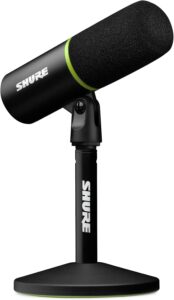
The Shure MV6 is my favorite overall microphone for someone who spends a lot of time in Zoom meetings.
It’s a dynamic USB microphone designed for speech, gaming, streaming, and other desktop applications. That dynamic design can be useful in a home office.
Sensitive condenser microphones can capture a lot of detail, but they can also make room reflections, keyboard sounds, computer fans, and other noises more noticeable.
The MV6 is designed to work relatively close to your mouth. Place it on your desk or a boom arm and keep it reasonably close while speaking. USB connectivity keeps things simple.
You don’t need an audio interface or XLR cable. Connect the microphone to your computer and select it as the input device in Zoom.
The MV6 also includes digital processing designed to make voice recording easier. For someone who wants a serious desktop microphone without building a complicated recording setup, it’s a great fit.
2. RØDE NT-USB Mini – Best Compact USB Mic for Zoom
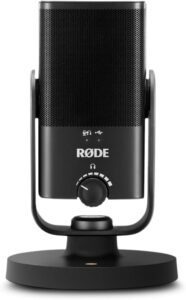
Desk space matters. If your home office already contains a laptop, monitor, keyboard, mouse, webcam, speakers, and notebooks, you probably don’t want a huge microphone taking over the remaining space.
That’s where a compact microphone such as the RØDE NT-USB Mini makes sense. It’s a small USB condenser microphone designed for desktop recording. The USB connection means you don’t need an audio interface.
The microphone also includes a headphone output, which can be useful when you want to monitor audio without relying on your computer’s headphone connection. Its small footprint makes it particularly attractive for home offices.
You could leave it beside your monitor permanently without turning your workspace into a recording studio. Because it’s a condenser microphone, you’ll want to pay attention to your environment. Keep it relatively close and avoid placing it next to a loud keyboard or computer fan.
3. Shure MV7+ – Best Premium Zoom Microphone
If you use the same microphone for Zoom meetings, podcasts, YouTube videos, and streaming, consider spending more on the Shure MV7+.
It’s a dynamic cardioid microphone with both USB-C and XLR connections. For Zoom, USB is the important part. Connect it directly to your computer and select the MV7+ as your microphone.
The dynamic design works particularly well for close speech, which is exactly what you’re doing during most online meetings.
The MV7+ also includes digital features such as Auto Level Mode, real-time denoising, and digital plosive reduction.
These features are more important for content creation than an ordinary business meeting, but they’re useful if you want one microphone to handle everything. The XLR connection also gives you an upgrade path.
If you eventually build a podcast or recording studio, you can connect the same microphone to an audio interface or mixer.
4. Blue Yeti – Best Versatile Zoom Microphone
The Blue Yeti became one of the most recognizable USB microphones because it’s simple and flexible. You connect it directly to a computer through USB. No audio interface is necessary.
One of the Yeti’s biggest advantages is its selection of pickup patterns. For a normal Zoom meeting where you’re the only person speaking into the microphone, cardioid mode is generally the most useful.
It focuses primarily on sound arriving from the front. Other patterns can be useful if several people need to use the same microphone.
For example, an omnidirectional pattern captures sound from around the microphone. That can make the Yeti more flexible than a microphone designed strictly for one speaker.
The downside is sensitivity. The Yeti is a condenser microphone and can pick up more room sound than you expect. Keep it relatively close to your mouth instead of putting it at the far end of your desk.
5. Audio-Technica AT2020USB-X – Best for Professional-Sounding Calls
If you want a more traditional studio microphone for your Zoom setup, consider the Audio-Technica AT2020USB-X.
It’s a USB condenser microphone based around the studio-style approach of Audio-Technica’s AT2020 family.
The microphone connects directly through USB, so you don’t need an external audio interface. A condenser microphone can provide a clear and detailed voice, but your room matters.
If you’re working in a quiet office with curtains, carpet, furniture, and relatively little echo, that’s great.
If you’re sitting in a large empty room with hard walls and a mechanical keyboard, a close-positioned dynamic microphone may be easier.
6. Samson Q2U – Best Budget Zoom Microphone
You don’t need to spend hundreds of dollars to improve your Zoom audio. The Samson Q2U is a dynamic microphone with USB and XLR connectivity.
For meetings, simply use USB. Connect it directly to your computer and select it in Zoom.
The dynamic design works well for close speech and can be easier to manage in a noisy home office than a sensitive condenser microphone.
Another advantage is future flexibility. Maybe today you only need a microphone for video calls. Six months from now, you decide to start a podcast. The Q2U’s XLR connection means you can connect it to an audio interface or mixer later.
For someone who wants to improve meeting audio while spending as little as possible, that’s excellent value.
Final Thoughts
You don’t need a studio-quality microphone just to sound professional in a Zoom meeting. You need a microphone that suits your environment.
For most people working alone from a home office, a dynamic USB microphone such as the Shure MV6 is an excellent starting point.
For a compact desktop setup, the RØDE NT-USB Mini makes more sense. For people who also record podcasts or videos, the Shure MV7+ gives you USB simplicity now and XLR connectivity for a more advanced setup later.