


If you spend several hours every week in Zoom meetings, a good pair of headphones can make a surprisingly big difference.
Laptop speakers and built-in microphones are convenient, but they aren’t always ideal. Your coworkers may hear background noise, your microphone may pick up the sound coming from your speakers, and it can be difficult to understand people when you’re working in a noisy room.
A good Zoom headset solves several of these problems at once.
You get headphones that make other participants easier to hear and a microphone positioned close to your mouth. Many business headsets also include active noise cancellation, background-noise reduction, dedicated mute controls, and wireless connectivity.
For most people, the Jabra Evolve2 65 Flex is my favorite overall Zoom headset. It’s lightweight, portable, Zoom-compatible, and designed specifically around professional calls. The Logitech Zone Wireless 2 is another excellent option if background noise is a major problem, while the Poly Voyager Focus 2 is a strong choice for people who spend most of the working day on calls.
What is the Best Zoom Headphones?
Here are some of the best headphones for Zoom meetings.
1. Jabra Evolve2 65 Flex – Best Zoom Headphones Overall
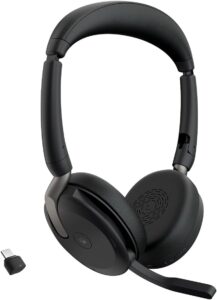
The Jabra Evolve2 65 Flex is one of the best choices for someone who wants a headset primarily for work.
Unlike ordinary consumer headphones with a microphone added as an extra feature, the Evolve2 65 Flex is built around business calls and online meetings.
It uses an on-ear design and weighs around 136 grams, making it considerably lighter than many large over-ear wireless headphones. That matters if you regularly spend several hours in meetings.
Jabra includes hybrid active noise cancellation to reduce distractions around you. There’s also HearThrough mode when you need to hear what’s happening around you without removing the headset.
The stereo model uses multiple MEMS microphones, while the boom microphone positions voice pickup closer to your mouth. Battery life is strong too.
Jabra rates the Evolve2 65 Flex for up to 20 hours of talk time with ANC and the busylight turned off, or up to 15 hours with ANC and the busylight enabled.
You can connect through Bluetooth, USB-A, or USB-C depending on your setup. The headset is also certified for leading meeting platforms, including Zoom.
2. Logitech Zone Wireless 2 – Best for Noisy Offices
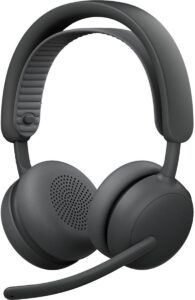
The Logitech Zone Wireless 2 is designed specifically for professional communication.
That makes it a particularly good option if you work in a busy office or another environment where background noise is difficult to avoid. The headset uses multiple microphones for active noise cancellation and calls.
Logitech’s current specifications list five omnidirectional MEMS microphones used across ANC and call functions.
You also get active noise cancellation for what you hear. This distinction is important. Headphone ANC reduces the noise reaching your ears.
Microphone noise processing tries to prevent the person on the other end of the Zoom call from hearing the noise around you. For people working in open offices, both can be valuable.
The Zone Wireless 2 provides up to 15 hours of talk time with ANC enabled and up to 18 hours with ANC turned off.
Listening time reaches up to 22 hours with ANC and 40 hours without it. There’s also a quick-charge feature. Five minutes of charging can provide up to an hour of talk time.
The UC version is certified for Zoom, along with other major business communication platforms.
3. Poly Voyager Focus 2 – Best for All-Day Zoom Calls
If your calendar seems to contain one meeting after another, comfort and microphone performance become incredibly important. The Poly Voyager Focus 2 is designed around that kind of workday.
It includes hybrid active noise cancellation, along with microphone noise cancellation using Poly’s Acoustic Fence technology.
The microphone boom can also be rotated to mute the headset. That’s a small feature, but it’s extremely convenient.
Instead of searching for Zoom’s mute button while someone suddenly starts talking to you in the room, you can simply move the microphone boom. Battery life is another strength.
HP currently rates the Voyager Focus 2 for up to 25 hours of talk time when ANC and the online indicator are turned off.
With ANC and the online indicator enabled, the rated talk time is up to 16 hours. Music playback can reach up to 40 hours with ANC disabled.
For someone who spends most of the workday switching between Zoom calls, phone calls, and music, that kind of battery life is useful.
4. Jabra Evolve2 65 – Best for Battery Life
The regular Jabra Evolve2 65 is another excellent business headset. It’s particularly attractive if you care about battery life.
Jabra rates it for up to 35 hours of talk time when the busylight is turned off, or up to 24 hours with the busylight enabled.
Music playback can reach up to 37 hours. That means many users can get through several working days without constantly worrying about charging.
The headset uses three digital MEMS microphones and is Zoom-certified. The boom microphone is another reason I’d choose a business headset over ordinary Bluetooth headphones for frequent meetings.
Keeping the microphone close to your mouth makes it easier to capture your voice clearly. The Evolve2 65 may not offer every newer feature of the Evolve2 65 Flex, but it’s still a practical option for people who prioritize long battery life and business communication.
5. Logitech Zone Wireless 2 – Best Zoom Headset for Multiple Devices
Many people don’t use Zoom on only one device. Maybe your main meetings happen on a laptop. Then a client calls your smartphone. Later, you want to listen to music from another device. A business headset with multipoint connectivity can make this easier.
The Logitech Zone Wireless 2 can maintain two active connections and remember several paired devices.
It supports Bluetooth along with USB receiver connectivity, depending on the version. Logitech also lists a wireless range of up to 50 meters in open line-of-sight conditions.
Real-world range will depend heavily on walls, interference, and your computer setup, but wireless freedom can still be useful around a home office.
You can stand up, walk to another part of the room, and continue listening to a meeting without staying directly beside your laptop.
Final Thoughts
For most users, the Jabra Evolve2 65 Flex is my best overall Zoom headset. It weighs around 136 grams, provides hybrid active noise cancellation, supports Bluetooth and USB connectivity, and offers up to 20 hours of rated talk time under favorable settings.
It’s also certified for Zoom Rooms and other major collaboration platforms.
For a noisy office, choose the Logitech Zone Wireless 2. For people who spend most of their working day on calls, consider the Poly Voyager Focus 2.
If you want maximum battery life, the regular Jabra Evolve2 65 remains a strong option. And if you’re on a tight budget, don’t overlook a basic wired USB headset.