


A good microphone is only part of a recording setup. If you’re using an XLR microphone, you still need a way to get that signal into your computer. That’s where an audio interface comes in.
An audio interface sits between your microphone or instrument and your computer. It provides microphone preamps, converts analog sound into digital audio, lets you monitor through headphones, and often connects studio speakers too.
For podcasters, singers, musicians, streamers, and home-studio creators, it’s one of the most important pieces of equipment you can buy.
The good news is that modern interfaces have become very good.
You don’t need to spend $1,000 to get clean audio anymore. Plenty of models under $200 can produce excellent recordings.
What is the Best Audio Interfaces?
Here are some of the best audio interfaces worth considering.
1. Focusrite Scarlett 2i2 4th Gen – Best Overall Audio Interface
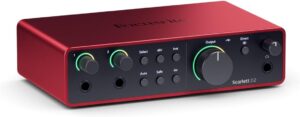
For most people, I’d start with the Focusrite Scarlett 2i2 4th Gen. The Scarlett series has been one of the most popular entry points into home recording for years, and the current 2i2 remains an excellent all-around option.
You get two microphone preamps, two inputs, two outputs, USB-C connectivity, and recording up to 24-bit/192 kHz.
The two inputs make it much more flexible than a single-input interface. You can record two microphones at the same time. Or connect a microphone and guitar.
For podcasting, that means you could record yourself and a co-host with separate XLR microphones.
Focusrite also added features such as Auto Gain and Clip Safe on the fourth-generation model, which can help beginners set recording levels. The Air modes let you add a little extra character to recordings when you want it.
Best for: Beginners, podcasters, singers, guitarists, and home studios.
2. Audient iD4 MKII – Best Audio Interface for Beginners
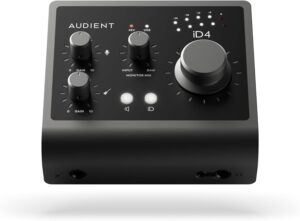
If you only need one main microphone input, the Audient iD4 MKII is another excellent choice. Audient comes from the professional console world, and the company brings that experience into its smaller interfaces.
The iD4 MKII gives you one Audient microphone preamp, an instrument input, headphone outputs, monitor outputs, and USB connectivity.
Its layout is simple. That’s a good thing. A beginner doesn’t necessarily need eight inputs and 40 buttons.
You want to connect your microphone, set the gain, plug in headphones, and record. The iD4 MKII is also compact enough for a small desk.
The main limitation is obvious. You only get one microphone preamp. If you know you’ll record two people at the same time, I’d choose the Scarlett 2i2 instead.
Best for: Solo podcasters, singers, voiceover creators, and beginners.
3. MOTU M2 – Best for Metering and Monitoring
The MOTU M2 is another interface that regularly gets recommended in the same conversation as the Scarlett 2i2. One of its standout features is the display. You get clear full-color level meters directly on the front of the interface.
That may sound like a small thing. It isn’t. Good metering makes it much easier to see whether your microphone signal is too quiet or dangerously close to clipping.
The M2 gives you two inputs, two outputs, microphone preamps, MIDI connectivity, headphone monitoring, and USB-C. It’s also known for low-latency performance. For podcasters and musicians who want clear visual feedback while recording, that’s valuable.
If you constantly find yourself staring at tiny level meters inside your recording software, having proper hardware metering feels much better.
Best for: Home studios, musicians, and users who want excellent hardware meters.
4. Universal Audio Volt 2 – Best for Vintage-Style Character
Not everyone wants a perfectly neutral interface. Sometimes you want a little character. That’s where the Universal Audio Volt 2 becomes interesting.
Universal Audio is known for professional studio equipment and plugins, but the Volt range is designed to be much more accessible.
The Volt 2 gives you two microphone/instrument inputs, MIDI connections, headphone monitoring, and USB connectivity.
It also includes a Vintage Mic Preamp mode. This adds coloration inspired by classic tube preamps. You don’t have to use it.
But it’s nice to have when you want vocals or instruments to feel slightly more colored and less clinical.
For singers, songwriters, and home producers, that’s one of the main reasons to consider the Volt instead of a more neutral interface. If you want onboard compression too, the Volt 276 is the model to look at.
Best for: Vocals, singer-songwriters, and creators who like vintage-style tone.
5. SSL 2+ MKII – Best Premium Interface Under $300
Solid State Logic has built some of the most famous recording consoles in professional studios. The SSL 2+ MKII brings some of that studio identity into a compact USB interface.
It gives you two microphone preamps, multiple outputs, MIDI connectivity, headphone connections, and modern high-resolution conversion.
One of the headline features is SSL’s 4K mode. This adds a little harmonic character inspired by SSL’s classic 4000-series consoles. Again, it’s optional.
You can record cleanly when you want transparency and switch on 4K character when you want a slightly more forward sound.
The newer MKII also supports up to 32-bit/192 kHz recording.
Best for: Serious home studios, vocals, instruments, and producers wanting SSL-style character.
6. Focusrite Scarlett Solo 4th Gen – Best Budget Solo Interface
Maybe you don’t need two microphone inputs. Maybe you’re one person recording one microphone. In that case, the Scarlett Solo can save you money.
It gives you one microphone preamp plus a separate instrument input. That makes it ideal for solo podcasters, singers, and guitarists. For a podcast setup, your signal chain could be:
XLR microphone → Scarlett Solo → computer
The biggest limitation appears when you add another person. You can’t suddenly connect two XLR microphones to one Scarlett Solo.
If there’s a realistic chance you’ll regularly record a co-host, I’d spend more on the 2i2 from the beginning.
Best for: Solo creators on a budget.
7. RME Babyface Pro FS – Best Professional Portable Interface
Once you move into professional territory, the priorities change. Driver stability matters more. Routing matters more. Conversion quality matters more.
You may need professional synchronization and much more control over how signals move through your studio. That’s where an interface such as the RME Babyface Pro FS comes in.
RME has a strong reputation among professional users for stable drivers and powerful routing software.
The Babyface Pro FS is compact enough to move around but significantly more advanced than a basic beginner interface.
You get microphone inputs, instrument and line connectivity, headphone monitoring, digital expansion, and RME’s TotalMix FX routing system. For professional mobile recording or serious studio work, however, it makes much more sense.
Best for: Professionals, mobile engineers, and advanced home studios.
8. Universal Audio Apollo Twin X – Best for UAD Users
The Apollo Twin X sits in another part of the professional market. Its main attraction isn’t simply the inputs and outputs. It’s the Universal Audio ecosystem.
Apollo interfaces can use UAD processing and Unison-enabled preamp workflows, giving creators access to software models of classic studio hardware while recording.
This can be extremely useful for musicians and producers who already work with Universal Audio plugins. You might track vocals through a virtual preamp and compressor and monitor the effect with very low latency.
That’s a much more advanced workflow than you’ll get from a basic $150 interface. But you pay for it.
For a first audio interface, it’s probably unnecessary. For an experienced producer already invested in Universal Audio, it’s much easier to justify.
Best for: Professional producers and existing UAD users.
What Does an Audio Interface Actually Do?
An audio interface is basically the bridge between analog recording equipment and your computer. Your microphone produces an analog electrical signal. Your computer needs digital audio. The interface converts one into the other. It also includes microphone preamps.
These boost the relatively quiet signal coming from a microphone to a useful recording level. Then the interface works in reverse when you’re listening.
Digital audio from your computer is converted back into analog sound that can be sent to headphones or studio monitors.
That’s why an interface is much more than a fancy adapter.
What Is Phantom Power?
If you’re using an XLR condenser microphone, it may require 48V phantom power. Most modern audio interfaces provide this. You’ll normally see a button marked 48V.
Dynamic microphones such as the Shure SM7B generally don’t need phantom power themselves.
But some inline gain boosters used with dynamic microphones may use it. Always check your microphone’s requirements before switching features on.
How Much Gain Do You Need?
This matters especially with dynamic broadcast microphones. Microphones such as the Shure SM7B have relatively low output. That means they need plenty of microphone preamp gain.
A weak interface may force you to turn the gain nearly all the way up. That can increase unwanted preamp noise.
Modern interfaces have improved considerably here, but you should still check the gain available if you’re buying an especially demanding microphone.
If you’re using a typical condenser or more sensitive dynamic microphone, this is less likely to become a problem.
What Is Latency?
Latency is the delay between making a sound and hearing it through your computer.
Imagine speaking into a microphone and hearing your voice come back through your headphones a fraction of a second later. It’s incredibly distracting. Good interfaces provide low-latency performance and often direct monitoring.
Direct monitoring lets you hear the incoming microphone signal without waiting for it to travel through your computer software and back.
For vocals and podcasting, that’s extremely useful.
Final Thoughts
The best audio interface isn’t necessarily the one with the highest sample rate or the longest feature list.
It’s the one that gives you enough inputs, enough clean microphone gain, reliable drivers, good monitoring, and a workflow that doesn’t slow you down.
For most home studios, two inputs are enough. That’s why the Focusrite Scarlett 2i2 4th Gen is my best overall recommendation.
It’s capable enough for podcasts, vocals, guitars, voiceovers, and small music projects without becoming unnecessarily complicated.
More importantly, it’s the kind of interface you can start with and continue using as your recording skills improve.
Don’t spend months comparing tiny specification differences.
Choose an interface that fits your microphone and the number of people or instruments you actually record. Then connect everything and make something.