


Blue microphones have been a familiar sight on YouTube, Twitch streams, podcasts, and home recording desks for years.
The original Blue Yeti played a big part in making USB microphones popular with everyday creators. Instead of buying an XLR microphone, audio interface, cables, and other equipment, you could connect one microphone directly to a computer and start recording.
Today, the lineup has expanded.
You can still buy the classic Yeti, but there are also smaller USB microphones, gaming-focused models, and professional XLR broadcast microphones.
That creates an obvious question: which Blue microphone should you buy?
For most people, the classic Blue Yeti remains the best all-around option because it combines easy USB connectivity with four pickup patterns and useful onboard controls. But podcasters, streamers, and professional creators may be better served by a different model.
What is the best Best Blue Microphones?
Here are the best Blue microphones to consider.
1. Blue Yeti – Best Overall Blue Microphone
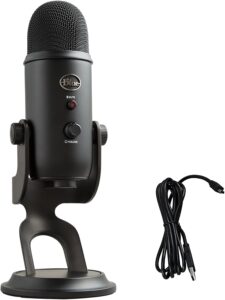
The Blue Yeti remains my overall recommendation for someone who wants a flexible USB microphone. Its biggest advantage is versatility.
The Yeti uses three condenser capsules and gives you four pickup patterns: cardioid, omnidirectional, bidirectional, and stereo.
Cardioid is what most people will use for podcasts, streaming, voiceovers, and YouTube videos. It focuses primarily on the person sitting in front of the microphone.
Bidirectional mode records from the front and back. That can be useful for an interview where two people are sitting opposite each other with one microphone between them.
Omnidirectional captures sound from around the microphone, making it useful for group discussions or room recordings.
Stereo mode captures left and right information and can be interesting for instruments and ASMR.
The Yeti also has a headphone output for zero-latency monitoring, microphone gain control, and a mute button.
Most importantly, it’s USB. You don’t need an audio interface. For someone who wants one microphone capable of handling several different types of content, the Yeti is still difficult to beat.
Best for: Podcasting, YouTube, streaming, ASMR, voiceovers, and general recording.
2. Blue Yeti Nano – Best Compact Blue Microphone
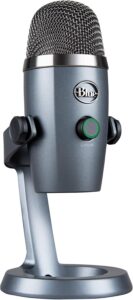
The regular Yeti is versatile, but it isn’t exactly small. If desk space matters, consider the Yeti Nano. The Nano takes the basic Yeti concept and puts it into a smaller package.
It’s a USB microphone designed for podcasting, streaming, YouTube, calls, and voice recording. You get two pickup patterns instead of four.
Cardioid is designed for recording a source in front of the microphone, while omnidirectional captures sound from around it.
For most solo creators, that’s enough. If you’re recording a podcast by yourself, you’ll probably use cardioid almost all the time anyway. The Nano also provides a headphone output for monitoring. The compact design is especially useful for small desks or portable setups.
If you don’t need stereo or bidirectional recording, the Yeti Nano can provide most of what you actually need without taking up as much room as the full-size Yeti.
Best for: Small desks, beginners, solo podcasts, and portable setups.
3. Logitech G Yeti GX – Best Blue-Style Microphone for Streaming
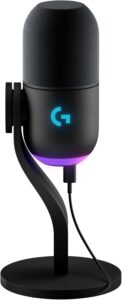
The Yeti GX takes the Yeti family in a different direction. Instead of using a condenser capsule like the classic Yeti, the GX uses a dynamic microphone capsule with a supercardioid pickup pattern.
That can be a major advantage for streamers. Gaming setups aren’t always quiet. You may have a mechanical keyboard directly in front of you. Your computer may contain several fans. Someone could be talking in another part of the room. A dynamic microphone used close to your mouth can make it easier to keep the focus on your voice.
The Yeti GX is specifically designed for game streaming and uses USB connectivity, so you don’t need an audio interface.
It also provides Blue VO!CE processing through Logitech G HUB. Another useful feature is the gain control.
The microphone uses a scroll-wheel-style control, and its Smart Audio Lock feature can help prevent clipping while reducing distracting background sounds.
If your main goal is streaming rather than recording instruments or ASMR, I’d choose the Yeti GX over the classic Yeti.
Best for: Gaming, Twitch, streaming, and noisy computer setups.
4. Blue Sona – Best Blue Microphone for Podcasting
If you’re building a more serious podcast setup, look at the Blue Sona. Unlike the Yeti family, the Sona isn’t designed around direct USB recording.
It’s an XLR dynamic broadcast microphone. That means you’ll need an audio interface, mixer, or podcast production console.
Why make things more complicated? Because an XLR broadcast microphone gives you more flexibility when building a larger studio.
Imagine you’re recording a four-person podcast. Using four separate USB microphones on one computer can become awkward.
An audio interface or mixer with four XLR microphones gives you a much cleaner workflow. The Blue Sona also includes built-in active electronics designed to provide additional gain.
That’s useful because traditional broadcast dynamic microphones can require a lot of preamp gain.
The Sona is the model I’d consider if you want the broadcast-style look and workflow associated with professional podcast studios.
Best for: Professional podcasts, broadcasting, and XLR studio setups.
5. Logitech G Yeti Orb – Best Budget Option
If you want something inexpensive and simple, consider the Yeti Orb. This microphone is designed primarily for beginner gaming and streaming setups.
It uses a condenser capsule with a cardioid pickup pattern. That means it’s much simpler than the classic Yeti.
You don’t get four different pickup modes. For many beginners, that isn’t a problem. If you’re one person sitting in front of one microphone, cardioid is probably what you need anyway. The Yeti Orb also connects directly through USB.
Put it on your desk, connect it to your computer, select it as your input device, and you’re ready to start experimenting.
It also works with Logitech G HUB and Blue VO!CE presets. The Orb isn’t the microphone I’d choose for building a professional recording studio. That’s not what it’s trying to be.
It’s an accessible starting point for someone who wants better voice quality than a laptop or headset microphone.
Best for: Beginners, gaming, Discord, and budget streaming setups.
6. Blue Yeti X – Best for Advanced USB Recording
The Yeti X builds on the original Yeti concept. Instead of the original model’s three-capsule design, the Yeti X uses a four-capsule condenser array.
It still gives creators four pickup patterns, making it useful for solo speech, interviews, group recording, and stereo applications.
One of its most useful additions is real-time LED level metering. This lets you see how loud your signal is directly on the microphone. That’s valuable because recording too loudly can cause clipping. Once digital audio clips badly, fixing it afterward can be difficult or impossible.
The Yeti X also has a multifunction control and integrates with Blue VO!CE processing. For someone who likes the flexibility of the original Yeti but wants more direct visual control over recording levels, the Yeti X is an attractive upgrade where it’s available.
Best for: Advanced streaming, podcasts, YouTube, and USB recording.
What Happened to Blue Microphones?
You may notice that newer Yeti products carry Logitech G branding rather than the old standalone Blue Microphones branding. That’s because Blue became part of Logitech.
Today, Logitech sells microphones including the classic Yeti, Yeti Nano, Yeti GX, Yeti Orb, and Blue Sona within its microphone and creator product families.
So if you’re searching for a “Blue microphone” and see Logitech branding, don’t assume you’ve found the wrong product. The Yeti name continues.
Condenser vs Dynamic Blue Microphones
Understanding this difference can save you from buying the wrong microphone. The classic Yeti, Yeti Nano, and Yeti Orb use condenser technology.
Condenser microphones are sensitive. They can capture detailed voices and subtle sounds, but they can also capture more of the room around you.
The Yeti GX and Blue Sona use dynamic microphone technology. Dynamic microphones are popular for broadcasting and streaming because you can place them close to your mouth and get a strong voice signal while reducing the importance of the room.
If you have a quiet room and want versatility, condenser makes sense. If your room is noisy and you’re mainly recording speech, consider dynamic.
Do Blue Microphones Need an Audio Interface?
Most Yeti models don’t. That’s one of their biggest advantages. The classic Yeti, Yeti Nano, Yeti GX, and Yeti Orb connect directly to your computer through USB.
The Blue Sona is different. It’s an XLR microphone designed for a traditional professional audio setup. Your signal chain might look like this:
Blue Sona → XLR cable → audio interface → computer
USB is simpler. XLR gives you more flexibility when you’re building a larger studio.
Final Thoughts
Blue became famous because it made good recording much easier for ordinary creators. The Yeti didn’t require you to understand microphone preamps, phantom power, audio interfaces, or complicated signal routing.
You plugged it into a computer and started recording. That simplicity is still valuable. For that reason, the Blue Yeti remains my best overall Blue microphone.
It gives you cardioid, bidirectional, omnidirectional, and stereo pickup patterns in one USB microphone. That means the same microphone can handle a solo podcast today, an interview tomorrow, and an ASMR experiment next week.
But the Yeti isn’t automatically right for everyone. Streamers should seriously consider the dynamic Yeti GX. Beginners on a smaller budget can start with the Yeti Orb. And serious podcasters building an XLR studio should look at the Blue Sona.
Start with what you’re actually recording. The best microphone isn’t the model with the longest specification sheet. It’s the microphone that makes getting a clean recording simple enough that you can concentrate on creating.